
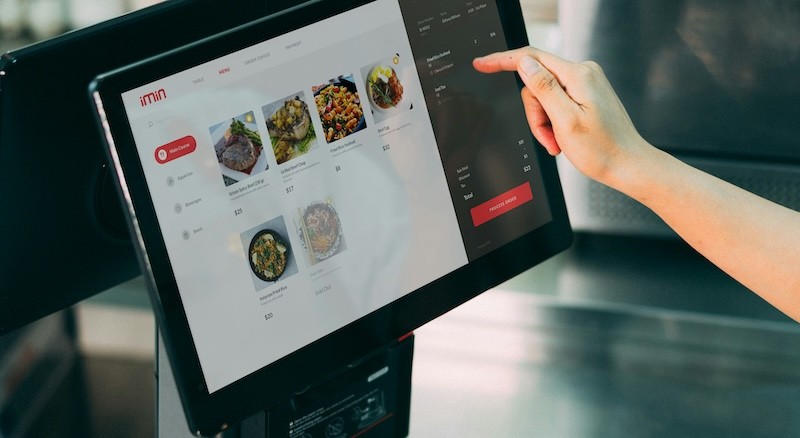
Restaurants switch POS systems for a few different reasons. Some want lower costs, more flexibility, or features that fit their day-to-day operations better. Others are ready for a system that feels easier to use or makes room for growth.
Toast remains a capable restaurant POS with 24/7 support and over 200 partner integrations. That works well for many operators. Still, some restaurants reach a point where the price, setup, or hardware limits stop working for their needs.
This guide compares six Toast POS alternatives for restaurants in 2026. You will see where each one fits, what to watch in pricing, and how to switch with less stress.
Why Restaurants Look for Toast Alternatives
Restaurant owners often start comparing providers after they notice their processing bill growing faster than expected. Small differences in card rates do not feel huge at first. Once your monthly sales rise, that gap can take a real bite out of your margin.
Hardware lock-in comes up a lot, too. Toast uses its own hardware, which can be a problem if you want more freedom later. If a restaurant changes systems, those terminals usually do not come along for the move.
Internet dependence is another concern. Toast offers offline support, yet many restaurants still worry about what happens during an internet outage. Online orders, synced reporting, and connected tools can be interrupted until the connection is restored. If you run a busy dining room, a bar, or a food truck, that risk feels very real.
Contract terms matter too. Some restaurants want the freedom to change providers without worrying about exit fees or hardware agreements. Add-on costs can push the total monthly bill higher as well. Online ordering, rewards, payroll, and other extras may sit outside the base plan.
None of this means Toast is a bad system. It has restaurant-focused tools, strong brand recognition, and broad app support. It simply is not the right fit for every restaurant.
Top Toast POS Alternatives
Here is the short version. Some alternatives win on low entry cost. Some fit full-service dining better. One stands out for offline service and fee control. Here are six Toast alternatives, each addressing different pain points:
Blogic Systems
Best for restaurants that need offline reliability and 0% processing fees. Blogic Systems is an all-in-one restaurant POS with hybrid capabilities that mixes local stability with modern online tools.
What stands out against Toast is the offline setup. Blogic keeps the POS running even if the internet drops, then syncs data after the connection returns. That can be a big relief for restaurants in areas with spotty service, mobile concepts, and busy kitchens that cannot afford slowdowns in orders.
On the payment side, Blogic says BlogicPay® offers 0% processing fees with no hidden charges. For restaurants with tight margins, that is a serious point in its favor.
Outstanding customer support is another big plus. You get 24/7 access to a dedicated local contact, not a generic help desk. That makes a real difference when something breaks during service.
Blogic also adapts to different restaurant models; full-service, quick-service, mobile concepts. Instead of forcing your workflow into a template, the system can be customized to match how you actually work.
Consider Blogic Systems if internet stability worries you or if card fees are cutting too deeply into your margin.
Square
Best for small venues that want a quick setup. Square for Restaurants is a restaurant version of Square’s POS, with a simple setup and a free plan.
Its biggest advantage against Toast is the low barrier to entry. Square does not lock you into a contract, and you can cancel at any time. Square lists in-person processing at 2.6% + 10¢ on its public pricing page, which is easy to understand. Still, that rate can add up once a restaurant does more volume.
Offline support is limited, so ask what still works if the internet goes out. Square is easy to start with, yet it is lighter on restaurant tools than some rivals.
Square fits small cafes, food trucks, and counter-service restaurants with about $10K in monthly sales. Consider it if you want a low monthly starting point and simple service tools.
Lightspeed
Best for multi-location teams that closely monitor numbers. Lightspeed Restaurant is a POS built for operators who care about reporting, menu control, and stock visibility across sites.
Its edge against Toast is the reporting depth, plus free one-on-one setup help and a strong offline mode. If you spend a lot of time checking sales by daypart, menu group, or store, Lightspeed has a lot to offer.
The tradeoff is on the guest side. Some front-end tools require additional apps or external integrations, which can add costs and extra setup work. That may be fine for a group with a strong back office. It can feel like too much for a smaller independent spot.
Lightspeed fits multi-location restaurants that care deeply about sales reporting and menu control. Consider it if you want more insight into store performance and do not mind adding extra tools for some guest-facing features.
TouchBistro
Best for full-service restaurants that want an iPad setup. TouchBistro is an iPad-based restaurant POS with a front-of-house layout that many servers pick up quickly.
Its edge against Toast is the iPad-first design and clean dine-in screen layout. Staff can learn table management, seat mapping, and order entry without much friction. That makes it appealing for restaurants with a strong focus on table service.
The tradeoff is that some advanced tools require extra apps or paid add-ons. If you want a wider all-in-one setup, you may need to piece together more parts than expected.
TouchBistro is designed for full-service restaurants that prioritize the dine-in experience. Consider it if you want iPads on the floor and a server-friendly setup.
Clover POS
Best for restaurants that want flexible hardware. Clover POS is a widely used system sold through many payment providers and resellers.
Its main edge against Toast is hardware freedom. Clover devices are not tied to one closed hardware model in the same way, and pricing can vary by processor or reseller. That gives restaurant owners more room to shop around, though it can make comparisons harder at the start.
Clover’s hardware has a good reputation, and its app market is mature. It also supports kitchen display system setups. The real catch is consistency. Your experience can depend a lot on the reseller you choose, so support quality and payment terms may differ from one seller to the next.
Clover fits restaurants that want proven terminals without being locked into one ecosystem. Consider it if you want hardware flexibility and are willing to compare processor offers carefully.
SpotOn
Best for restaurants that want guest marketing tied closely to payments. SpotOn is a restaurant POS with payments, rewards, review tools, and campaign features under one roof.
Its edge against Toast is the built-in marketing side. Restaurants that care about repeat visits can use email, text campaigns, and guest rewards without relying on as many external tools. That can help keep your tech stack simpler.
SpotOn’s strength lies in the link between payments and guest outreach. You can track visit patterns and build offers around them. That makes it useful for restaurants that treat repeat traffic as a major growth channel.
SpotOn fits restaurants that are investing in guest retention and campaign automation. Consider it if you want payments and marketing tools from the same provider.
Side-by-Side Comparison: Toast vs. Top Alternatives
System | Offline mode | Processing fees | Hardware lock-in | Best for | Starting price |
Toast | Limited offline support | Quote-based, often tied to Toast Payments | Yes | Restaurants that want a large restaurant POS brand | Custom quote |
Blogic Systems | Full offline operation with sync later | 0% via BlogicPay® | No | Restaurants that need internet-independent service | Custom quote |
Square for Restaurants | Limited | 2.6% + 10¢ in person | No | Small cafes and counter service | Free plan available |
Lightspeed Restaurant | Strong offline support | Quote-based | No | Multi-location restaurants focused on reporting | Custom quote |
TouchBistro | Offline capable on the local network | Quote-based | No | Full-service iPad setups | Custom quote |
Clover POS | Varies by setup | Varies by processor or reseller | No | Restaurants that want flexible hardware | Custom quote |
SpotOn | Offline support available | Quote-based | No | Restaurants focused on payments plus marketing | Custom quote |
Public plan details and card rates can change. Check each vendor’s site before you sign.
What to Look for in a Toast Alternative?
Clear Payment Terms
Start with the payment side. Ask for the full rate sheet. Check card-present fees, keyed-in fees, chargeback fees, monthly platform fees, and any extra cost tied to PCI compliance. A cheap software plan can still lead to a high total bill if the payment side gets expensive.
An Offline Mode
This matters more than many owners expect. Ask what still works if the internet drops. Can staff take orders? Can you close checks? Can you run cards? Can the system sync sales later? A partial offline mode is very different from a setup that keeps the restaurant moving.
Hardware Freedom
Ask if the terminals, printers, and kitchen screens work with other systems. Hardware portability gives you options later. It can save money, too, especially if you grow into more than one location.
Set-up Help and Support Quality
A new POS touches every part of service. Menu setup, taxes, printer routing, staff training, and payment setup all need careful attention. Ask who helps during installation. Ask how support works after launch. Some vendors hand you a ticket number. Others give you a real person who knows your account.
Full Cost Over Time
Do not stop at the monthly software fee. Add hardware, payment costs, online ordering tools, rewards, payroll links, and support charges. That gives you a much better view of the real monthly spend.
Features and Tools
Most restaurants need more than a payment terminal. Check how the POS works with a kitchen display system, commonly called a KDS. Check online ordering, payroll, gift cards, and guest rewards, too. If those pieces do not work well together, the staff ends up doing extra work by hand.
How to Switch From Toast?
1. Export Data Before Canceling
Do this first. Pull menus, modifier groups, guest records, gift card data, and sales history before you close the account. A clean export saves a lot of time during setup on the new system.
2. Factor in Toast Hardware Replacement
Toast terminals are proprietary, so many restaurants replace them when switching. Make a full hardware list early. Include payment terminals, receipt printers, kitchen printers, kitchen screens, routers, and cash drawers.
3. Run Both Systems at One Location First
Test the new POS in one store before a full rollout. That gives you time to catch menu mistakes, printer routing issues, and staff questions in a lower-risk setting. A short side-by-side test can save a lot of stress later.
4. Confirm Contract Terms and Migration Help
Read the cancelation terms in your current agreement. Then ask the new provider what migration help is included. Some teams handle menu import, payment setup, and staff training for you. Others leave more of that work on your side.
5. Plan for a Short Launch Window
Many restaurant POS moves finish over a single weekend. That works best if the menu is ready, hardware is on site, staff training is done, and payment approval is complete before launch day. Keep Monday morning open for small fixes.
Bottom Line: Which Toast Alternative is Right for You?
Start with the problem that bothers you most:
If internet drops keep causing service issues, put offline capability at the top of your list.
If card fees are squeezing the margin, compare payment terms line by line.
If you want freedom later, ask about hardware portability before you sign anything.
If you run more than one store, spend extra time on reporting, menu control, and multi-site management.
Get the full monthly picture in writing. That means software, hardware, payment rates, extra modules, and support.
Ask each vendor to show the parts your staff uses every day: split checks, voids, refunds, tableside ordering, menu edits, and card processing during an internet outage. Those small moments tell you more than a polished sales deck.
If you want a closer look at how the POS system works, Blogic Systems offers a free demo to walk through your specific use case.

Erick Tu
Author
Related Articles
May 22, 2026
Loyverse POS Alternatives for Restaurants and Cafes in 2026

May 13, 2026
Top Lightspeed POS Alternatives for Restaurants

May 11, 2026
Square POS Alternatives for Restaurants in 2026
