
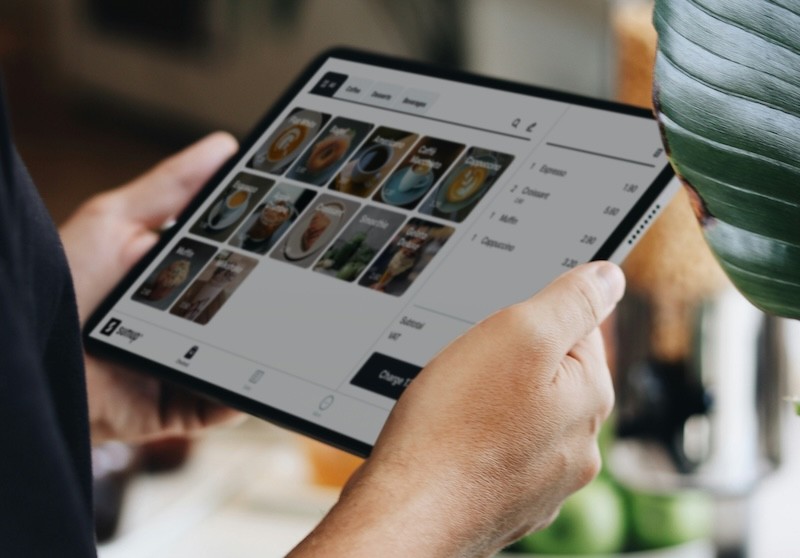
Every restaurant has its own way of moving through a shift. The service style, the menu, the kitchen setup, and the way the floor is managed. All of it varies depending on the concept and the crowd.
The POS system, though? That's the constant. The POS sits at the center of every one of these operations. Configurations change from one concept to the next, and are built around the workflows depending on the style of service. But the core mechanics of how a restaurant POS system works stay the same regardless of format or volume.
Before breaking down how it all works during service, it helps to understand what a restaurant POS system is and what it's made up of.
What Is a Restaurant POS System?
POS stands for "point of sale." In a restaurant, the POS system is the central platform that connects front-of-house, back-of-house, and management operations. It's where every order, payment, and piece of operational data passes through.
There are different types of POS systems on the market, and architecture matters more than most people think. Cloud-based systems run entirely online and depend on an internet connection. Legacy systems run locally on on-site servers. Hybrid systems combine both, pairing cloud access with local processing so the system stays operational even when the internet goes down.
Key Components of a Restaurant POS System
Two layers make up every POS setup: the hardware your team physically uses during service, and the software running behind it. A weak link on either side creates problems for the whole operation.
Hardware
A typical restaurant POS hardware setup includes:
Touchscreen terminals at server stations or the front counter
Handheld devices for tableside ordering
Kitchen printers or KDS screens for ticket routing
Card readers supporting chip, contactless, and mobile payments
Cash drawers and receipt printers
Restaurant environments destroy equipment. Grease, steam, heat, spills. Purpose-built POS hardware can handle those conditions. Consumer tablets on a stand? They work fine in retail. Next to a fryer, not so much.
Software
This is where the depth of the system lives. The software controls what your staff sees, how orders move through the restaurant, and where all operational data gets stored.
Most platforms bundle menu building, real-time floor tracking, sales and labor reporting, employee scheduling, and role-based permissions. Many also connect to third-party delivery apps, accounting tools, online ordering, and loyalty programs.
The difference between software that helps and software that frustrates comes down to organization and usability. Your team moves fast during service. If a new hire can't pick up the basics in a single training shift, the system is slowing you down rather than supporting you.
How POS Systems Work in a Restaurant (Step-by-Step)
What does the POS do during a live service? These steps follow a single transaction from start to finish, covering what happens at each stage and why it matters.
1. Taking the Order
The server pulls up the table on a terminal or handheld, selects items, adds modifiers, and confirms. Pretty straightforward on the surface.
What makes this fast or painfully slow is how your menu is built inside the system. Categories that make sense, modifiers grouped logically, popular items front and center. When the layout is clean, order entry takes seconds. When it's cluttered or disorganized, servers waste time scrolling, misfire on buttons, and errors start stacking during the rush.
Counter-service and fast-casual restaurants often shift this step to the guest. Customer-facing screens or QR code ordering handle the input, but the POS processes everything the same way on the backend.
2. Sending Orders to the Kitchen
After the server confirms, the POS takes over routing. Based on how the system is set up, each item goes to the right station. Apps to cold prep, entrées to the grill, drinks to the bar. Tickets print or display exactly where they need to.
Kitchens running a KDS (kitchen display system) instead of paper printers get a few extras:
Ticket timers track how long each order has been open
Status updates as items move through prep
Flags when something falls behind
That kind of visibility keeps the line moving without relying on verbal callouts or paper stacking up on the rail.
3. Managing Tables and Orders
Meanwhile, the POS is also tracking the dining floor. A live table map shows what's seated, what's waiting on food, and what's ready for the check.
Hosts use this to organize seats smartly. Servers use it to keep tabs on their section. When a six-top wants three separate checks and a dessert that fires after entrées clear, split checks, seat-level ordering, and course firing handle the logistics. Your staff focuses on service instead of juggling numbers in their head.
4. Generating the Bill
Closing time for the table. The POS assembles the check: item totals, tax, any discounts, loyalty rewards, and gift card balances. Restaurants that apply automatic gratuity for large parties or run time-based pricing like happy hour cutoffs have those rules baked into the system already.
Nobody has to remember to switch the pricing at 6 PM or manually calculate a service charge. It's handled. And fewer manual steps on the check means fewer mistakes landing in front of the guest.
5. Processing Payment
Credit, debit, tap, mobile wallet, cash. A modern POS supports multiple restaurant payment methods and processes them all the same way. The system communicates with the processor, verifies the transaction, and confirms. Takes seconds.
6. Issuing the Receipt
Payment clears, receipt generated. Most systems give you both printed and digital options. A growing number of restaurants are pushing emailed or texted receipts, which saves on paper and gives you a chance to collect guest contact info for future marketing.
7. Recording Data and Updating Inventory
Guests don't see this part, but for operators, it's where the POS really pays for itself.
Every closed transaction gets logged. What sold, when, which server handled it, what table, payment method, and the time the table was occupied. All of that POS data flows into your reporting dashboard. Sales breakdowns, labor ratios, item popularity, trend lines over weeks or months.
Inventory updates happen simultaneously. If your system tracks at the ingredient level, selling thirty burgers automatically subtracts thirty patties, thirty buns, and the right amount of each topping. Drop below a threshold you've set, and the system flags it before you discover the shortage during Saturday prep.
How Restaurants Manage the System Behind the Counter
The order-to-payment flow is what your guests experience. Behind that, there's a management layer that keeps the POS running properly. The POS needs regular attention to stay accurate and useful. Knowing how to use a POS system is one thing, but keeping it running well day to day is where most restaurants either stay sharp or start slipping. Most of this falls into daily routines and periodic maintenance that managers handle between or after shifts.
System configuration is where it starts. Table layouts, menu structure, modifier groups, tax rules, printer routing, station assignments. All of this gets built out before the first order is ever taken. How well this initial setup is done affects everything that follows. A rushed configuration leads to workarounds that stick around for months.
User roles and access control determine who can do what inside the system. A server shouldn't have the ability to void a $200 check. A host doesn't need access to labor reports. Setting clear permission levels protects the operation and keeps the system clean.
Software updates and maintenance need to happen regularly. Security patches, bug fixes, new features. Hybrid systems handle this better than most because updates can sync locally without pulling terminals offline during a busy shift.
Data backups and system reliability matter more than people think about until something goes wrong. How your POS stores data, where it backs up, and how fast it recovers after a crash or outage are things worth understanding before you need them.
Staff training is what holds it all together. The best-configured system in the world falls apart if your team doesn't know how to use the POS properly. New hires need hands-on training before their first real shift. Existing staff need walkthroughs when updates change how something works. Skip this, and people start making up their own process.
How the POS Connects All Restaurant Operations
No single feature makes a POS valuable. The value is in how all the pieces feed into each other.
One drink order at the bar sends a ticket to the bartender, pulls spirits from inventory, adds revenue to the server's running total, and creates a data point in the evening sales report. All of that happens automatically. Nobody enters the same information twice. Nobody cross-references a separate system.
Online orders, third-party delivery, loyalty programs, and gift card redemptions. Everything flows into one place instead of living across four platforms that don't communicate with each other.
When those connections are solid, you spend your time making decisions based on clear data. When they're fragmented, you spend it chasing numbers and patching holes.
Wrapping Up
Every stage of restaurant service passes through the POS. Understanding how the pieces work together gives you a better read on where your setup is helping and where it might be quietly costing you time, accuracy, or money.
If you're exploring what's out there, check Blogic Systems restaurant POS software designed for stability, speed, and the kind of flexibility that matches how restaurants operate day to day.

Erick Tu
Author
Related Articles

Aug 7, 2026
Bakery POS System Features: What to Look For Based on Your Bakery Type
May 8, 2026
Switching Restaurant POS System
May 1, 2026
How Much Does a POS System Cost for a Restaurant
Apr 27, 2026
Restaurant Workflow Automation: What to Automate First (and Why Most Operators Get It Wrong)
