
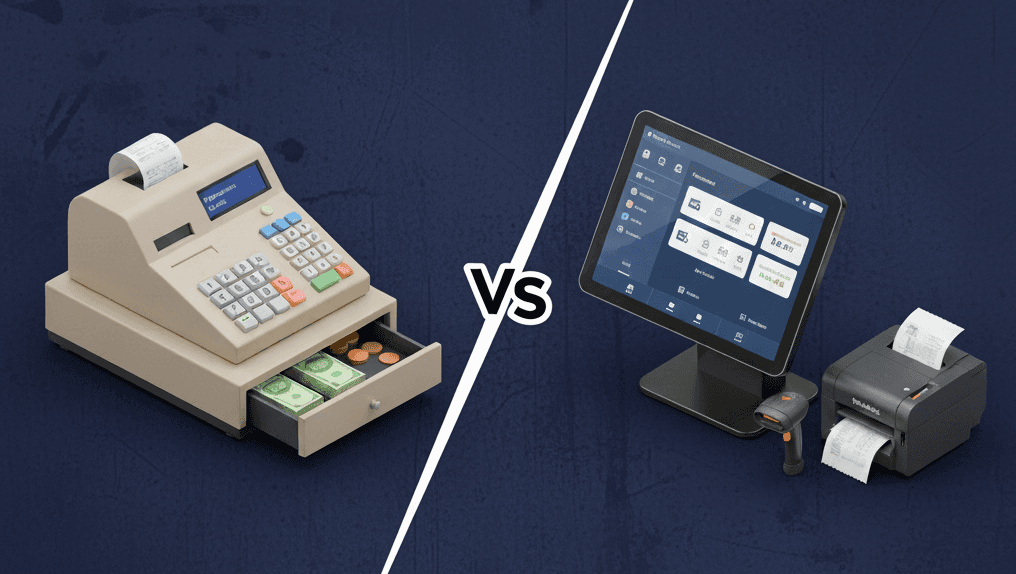
Most restaurants start with a cash register. It’s simple, familiar, and works when orders are few and the team is small. But as menus grow and service gets busier, your cash register can slow things down.
Modern restaurant POS systems do much more than basic payments. They manage order flow, track employee performance, and give real-time performance insights.
If you're wondering which option works best for your restaurant, the answer depends on how complex your service is and how much control you need over daily operations. Read on to see the differences between cash registers and POS systems and their features to make up your mind.
POS System vs. Cash Register: Quick Answer for Restaurants
Here's a simple breakdown: if you only take orders at a counter and hand food directly to customers, a cash register might work just fine. But most restaurants need more than that.
Table-service restaurants benefit from POS systems because they handle order modifiers, split checks among multiple diners, and automatically track tips. During busy lunch or dinner rushes, a POS system keeps orders organized and sends them straight to the kitchen, so nothing gets lost or forgotten.
If you have multiple staff members taking orders, managing tables, or handling different sections of your restaurant, then using a POS system gives you better control. It tracks who handled each order, when tables were seated, and how long each ticket took to complete. Cash registers can't handle that.
How POS Systems and Cash Registers Handle Daily Operations
Let’s look at two scenarios that show what happens during a busy dinner time at two similar restaurants.
Scenario 1
Picture this: it's 7 PM on a Saturday night, and your restaurant is packed. At Restaurant A, with their cash register setup, the host scribbles table numbers on scraps of paper, trying to remember which tables just sat down and which ones are ready for their check. When a customer asks about wait time, the host must manually estimate it by counting open orders and open tables.
Meanwhile, at Restaurant B, the host can view the entire floor plan on the POS system. Table 12 has been seated for 45 minutes and just ordered dessert, so they'll likely leave soon. Table 8 is ready to order, and Table 15 needs its check. The system even tracks average meal times, so when new customers walk in, the host can give accurate wait estimates.
Scenario 2
At Restaurant A, Server Sarah takes an order for a burger with no pickles, extra cheese, medium-well, with sweet potato fries instead of regular fries. She writes this on her pad, then has to remember every detail while punching "Burger #3" into the cash register. When the ticket prints in the kitchen, it just says "Burger #3" - so Sarah has to walk back and verbally tell the cook about all the modifications.
At Restaurant B, Server Mike taps the burger on his POS screen, then quickly selects "no pickles," "add cheese," "medium-well," and "substitute sweet potato fries." When this prints in the kitchen, everything is clear. The cook knows exactly what to make and prepares the order without confusion.
You can clearly spot the difference in each scenario.
Here’s how these two systems handle typical day-to-day restaurant operations:
Feature | Cash Register | POS System |
Table management | Manual or none | Digital table maps, order tracking per table |
Order modifiers | Difficult | Easy customization of extras |
Split checks & tips | Manual calculation | Automated split checks and tips |
Kitchen tickets | None or printed separately | Orders go directly to the kitchen screens or printers |
Staff tracking | Manual or basic | Shift logs, clock-ins, and permissions |
Reporting | Daily totals only | Detailed dashboards with performance data and reports |
Manual processes that feel manageable during slow periods can quickly become overwhelming during busier times. This leads to mistakes, delays, and frustrated customers. This comparison explains why many restaurants eventually stop using cash registers.
What Makes Cash Registers Limited for Restaurants
Cash registers work well for simple retail, but they have limitations in restaurants. In busy restaurants, cash registers can slow down service.
Some common problems include:
Manual errors: Handwritten tickets or verbal orders can easily lead to mistakes, especially for special requests or complex dishes.
Limited visibility for kitchen staff: Servers must communicate orders, which can lead to lost or delayed requests.
Slow checkout: Dealing with multiple checks, splitting bills, and adding tips can create long lines at the register.
Limited reporting: Daily totals do not offer insights into menu performance, peak hours, or staff efficiency.
Staff accountability challenges: Tracking shifts, tips, and responsibilities is manual and time-consuming.
Restaurants relying on cash registers often find themselves scrambling during rush hours, which can impact customer satisfaction and staff performance.
How POS Systems Simplify Restaurant Operations
A restaurant POS system ties management, front of house and back of house into one simple workflow.
Orders to the kitchen: Servers send orders with a tap. Modifiers print clearly on the ticket or show on a kitchen screen, so cooks make the right plate without extra back-and-forth.
Table and section management: You can see open, seated, and ready-for-check tables on a live map, with seat times and server assignments to plan turns and give accurate wait times.
Employee tools: Team members clock in and out on the POS. Sales and tips are tracked per person. You can set permissions to limit what each role can see and do, giving managers high-level access.
Sales insights: Check profit for each item, see busy hours throughout the day, and evaluate server performance. Use this information to schedule staff, update menus, and confidently order supplies.
Put together, these features speed up service, cut mistakes, and give you clear control of daily operations.
The True Cost of POS Systems vs. Cash Registers
Paying more initially for a POS system can really save you money over time, especially when it comes to cutting down on labor costs, order mistakes, and service friction. This is especially true for restaurants with large teams.
Cash register:
Needs lower upfront cost with minimal setup.
Suitable for very simple menus and single-server operations.
More errors, slower service, and less efficient use of labor.
POS system:
Needs higher upfront investment for software and hardware.
Reduces mistakes, helps track inventory, and improves staff management.
Supports complex menus, multiple servers, and faster service.
ROI is often realized within months due to improved service.
The real value comes from better decision-making. When you know which items are profitable and which times are busiest, you can staff more efficiently and focus on menu items that make money.
Signs It’s Time to Upgrade from a Cash Register to a POS
If two or more of these points resonate, your restaurant has outgrown a basic register and needs a restaurant POS system:
Adding table service: You need live table status, seat times, and direct kitchen routing so orders don’t get lost.
More people on shift: Separate logins, role-based access, and item-level tracking keep records clean and fair.
Daily tip math eats time: The POS calculates and logs tips per person, so payouts are quick and accurate.
Menus change often, or you add locations: Edit once and push updates to every station and site.
Rush-hour stalls at order or pay: Faster ordering and pay-at-table speed up lines and help you serve more guests.
Best Setup by Restaurant Type
Different restaurant formats need different approaches:
Quick Service Restaurants
For quick-service restaurants, speed is important. When choosing a POS system, look for one that can process payments quickly. Drive-thru locations need systems that work well with ordering boards and kitchen displays.
Casual Dining
For casual dining, choose systems that manage reservations, track table turnover, and organize waitlists. Features for modifying orders and splitting bills might be helpful too.
Full-Service Restaurants
Full-service restaurant operations need advanced systems. Look for table mapping, detailed reports, inventory tracking, and links with reservation features. Wine list management and cocktail modifiers are a good addition.
Bars and Cafés
Focus on quick ordering and payment processing. Mobile POS options work well for table service. Integration with loyalty programs helps build repeat business.
Food Trucks
For food trucks, pay attention to mobility. Choose systems that work without a constant internet connection and can handle high-volume, fast-paced service in a limited space.
What to Look for in a Restaurant POS System
When evaluating POS systems, consider these aspects:
Speed and offline mode: Orders and payments should continue without internet interruptions.
Kitchen integration: Orders automatically go to the right station or printer.
Tip and staff permissions: Can track daily sales, menu performance, labor, and inventory.
Reporting tools: Daily sales, menu performance, labor tracking, and inventory insights.
POS software features: Manages discounts, splits bills, tracks loyalty programs, and updates inventory in real time.
Testing a POS demo in real restaurant conditions can help determine if it meets workflow needs and supports both staff and customer experience.
To Sum Up
The choice between a POS system and a cash register comes down to your restaurant's complexity and growth plans. A simple counter service may use a register, but most restaurants do better with a good POS system. It helps them stay organized, serve customers quickly, and get valuable insights. Consider your current pain points, future plans, and budget when making this decision.

Erick Tu
Author
Related Articles

Aug 7, 2026
Bakery POS System Features: What to Look For Based on Your Bakery Type

May 8, 2026
Switching Restaurant POS System
May 1, 2026
How Much Does a POS System Cost for a Restaurant
Apr 27, 2026
Restaurant Workflow Automation: What to Automate First (and Why Most Operators Get It Wrong)
